
Copilot vs ChatGPT: Which Is Better for Work in 2026?
No time for long YouTube tutorials? Try Guidy and get it all done in minutes. It sits right on your screen and points you to exactly what to do in real time. And it works on any software or browser, in any language.
Try for free
Copilot vs ChatGPT is not a question about which model is smarter. Both are strong. It is a question about where your work happens and whose data the assistant is allowed to see, and those two answers decide the winner more reliably than any benchmark does.
This is a two-product comparison for work. For the wider field of assistants on Windows, our ranking of AI assistants for PC covers six of them against each other.
Where each one lives
This is the difference everything else follows from.
Microsoft Copilot
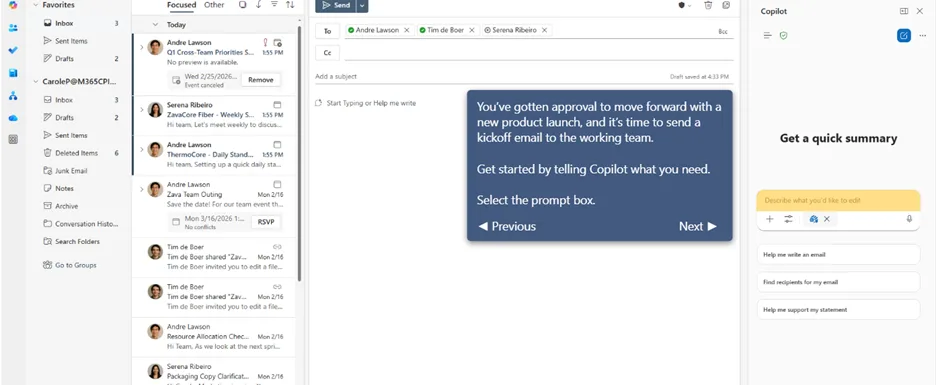
Copilot is built into the software. It appears inside Word, Excel, PowerPoint, Outlook and Teams, and on Windows 11 as a system-level assistant. You do not paste your document into it, because it is already looking at the document.
ChatGPT
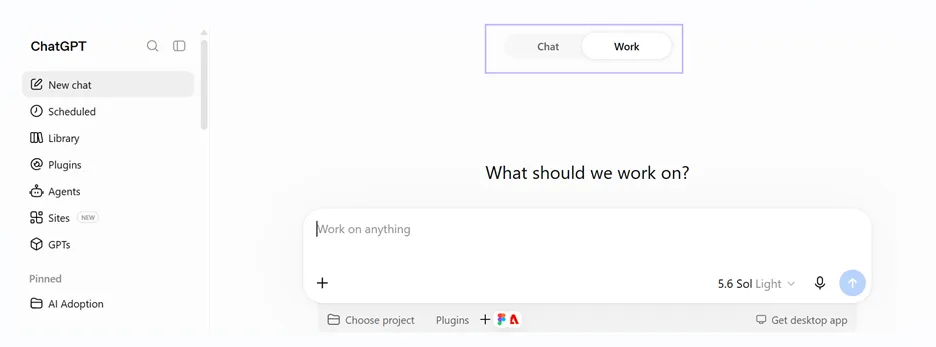
ChatGPT has two shapes and treating them as one is how this comparison goes wrong.
The chat surface in the Windows and Mac desktop apps and in the browser is a place you go rather than a place you already are. It can see your screen when you share snippets, and the work starts by bringing your material to it.
ChatGPT Work is different in kind. It connects to services such as mail, chat and file storage, and it carries a multi-step task through to a finished result rather than returning steps for you to perform. If you are comparing on what gets done rather than on what gets answered, that is the surface to weigh against Copilot.
Access to your company's data
Copilot's real advantage is not writing. It is that the work version can reach your organization's own content, so it can answer questions grounded in your files, your email and your meetings, inside the permissions you already have.
ChatGPT reaches your company's data only through connectors you set up, and through what you paste in. Its business tiers connect to a growing list of third-party workplace apps, which covers a wider set of tools than Microsoft's but with less depth in any one of them.
If your question is "what did we agree in that meeting", the assistant with access to the meeting has an advantage no model quality can close.
General reasoning, writing and research
ChatGPT is the stronger general-purpose tool, and this is not close.
It handles a broader range of tasks, has the larger ecosystem of integrations, and its higher individual tiers give substantially more usage for research and analysis than anything Microsoft sells to an individual. For open-ended thinking, drafting from scratch, and work that is not attached to a document you already have, it is the better instrument.
Copilot is stronger when the task is anchored to something specific: summarize this thread, rewrite this section, build a formula against this table. Its value comes from proximity to the work rather than from range.
Data and training defaults
This is the row most comparisons skip, and for a work decision it may be the most important one.
ChatGPT's business and enterprise tiers do not use workspace content to improve models by default. Its individual tiers do, unless the user turns it off. That means the same product behaves differently depending on which plan the person in front of it is paying for.
Copilot's work version operates inside your organization's existing controls and permissions rather than as a separate consumer service, which is the point of buying it as a work product.
Note: Check the current terms for whichever tier you are actually on rather than the terms for the tier you read about.
Screen awareness
Both can now look at your screen when you show it to them, but neither reads it continuously.
Copilot's screen feature works on a shared window or desktop and answers questions about what is there. The ChatGPT desktop app can do the same during a share.
The limit is the same for both chat surfaces.
They describe what they see and tell you what to do, and you translate that back into clicks in whatever application you have open. That is fine when the answer is a sentence and less fine when it is a menu path four levels deep in software you have never used. The agentic surfaces on both sides are the exception, because they act on the task rather than describing it, but that’s a topic for a different blog article.
Stop-and-try moment: If you have a brand-new software to learn or experience difficulty completing a task because you just don’t know the steps or the buttons’ locations, here’s your all-in-one solution: Guidy (you can get it for free now). It points on what to click next, right on your screen, no matter what the software. Guidy knows it all.
How each one is actually sold
This is where readers get the most out-of-date information, because both vendors restructured their pricing during 2026.
Copilot
There is a free chat tier that costs nothing. For individuals, Microsoft retired its standalone consumer Copilot subscription and now bundles the in-app AI into its Microsoft 365 consumer plans, with the AI features available to the subscription owner rather than to everyone on a family plan.
For work, Microsoft sells Copilot in three shapes and conflating them is why quoted prices vary so much.
Microsoft 365 Copilot, the enterprise product, lists at 30 dollars per user per month as an add-on on top of a qualifying base license. Microsoft 365 Copilot Business is the offer for smaller organizations, up to 300 users, with a list price of 21 dollars per user per month on an annual term and a promotional rate below that.
And Microsoft now sells small-business plans with Copilot bundled in as permanent products rather than as a base plan plus an add-on. Which shape applies to you changes the arithmetic completely.
ChatGPT
There is a free tier. Individual plans run from a low-cost entry tier through a standard tier at 20 dollars per month to high-usage tiers well above that. ChatGPT Business and Enterprise are sold per seat, add administrative controls, and carry the training default described above.
Both vendors have changed tier names and prices more than once this year. Treat every figure here as a starting point and confirm on the vendor's own pricing page before you commit a budget.
Which should you use?
Before answering this question, think about this: what proportion of your working day happens inside Microsoft 365?
- If the answer is most of it, Copilot wins, and the margin is not small. It is already installed, it sees the documents and the mail and the meetings, and the alternative involves moving your material to another window all day.
- If the answer is some of it, the honest recommendation is both, and many people already run both. Copilot for anything anchored to an Office file, ChatGPT for everything else.
- If the answer is very little, ChatGPT wins on range, and paying for Copilot buys you depth inside applications you barely open.
- If your work involves sensitive company content, the decision runs through governance rather than features. Look at which tier you would actually be on and what its data terms say, because that varies inside each product as much as between them.
- And if you don’t feel comfortable using either of the two, give a try to Guidy. Here’s why.😊
What neither of them solves
On their chat surfaces, both are answer engines, and an answer is not the same as knowing where to click.
When you are stuck inside unfamiliar software, both will produce a competent description of the steps, and you will still be the one hunting for the button. That gap is smaller than it was, because both can now look at your screen, and it has not closed.
Neither is a substitute for knowing your own data. Both will produce a confident summary of a spreadsheet that contains an error, and neither will tell you the error is there.
If the part you find hard is following steps inside software rather than getting an answer, our AI assistant for work page covers a different approach to the same problem.
Key takeaways
- Copilot sits inside your software, while ChatGPT splits between a chat surface you go to and an agentic surface that carries a task to a finished result
- The work version of Copilot can reach your organization's files, mail and meetings inside existing permissions, which no amount of model quality replaces
- ChatGPT is the stronger general-purpose tool for open-ended work, research and anything not anchored to an Office document
- ChatGPT's business tiers exclude workspace content from model training by default while its individual tiers do not, so the plan matters as much as the product
- Copilot for work comes in three shapes: the enterprise add-on at 30 dollars per user per month, Copilot Business for organizations up to 300 users at a 21 dollar list price, and small-business plans with Copilot bundled in
FAQs
Is Microsoft Copilot free?
There is a free Copilot chat tier that needs only a Microsoft account. The versions that work inside Office require a Microsoft 365 plan that includes that access. For organizational-data access, Microsoft sells both the traditional Copilot add-on for qualifying plans and small-business plans with Copilot bundled in.
Can I use both without paying twice for the same thing?
You can, and the overlap is smaller than it looks. They do different jobs well, and plenty of people run a Microsoft 365 plan for in-document work alongside an individual ChatGPT plan for everything else.
Which one is better at Excel?
Copilot has the advantage when you want AI working directly with the workbook you have open. Current Copilot in Excel can edit that workbook and, depending on license and mode, draw on other files, organizational context and web sources. The current hard checks are the workbook format and Calculation Options being set to Automatic. OneDrive storage and table formatting are no longer universal gates.
Does either one keep what I give it?
That depends entirely on the tier. Business and enterprise plans on both sides are built with stricter data handling than individual plans. Read the terms for the exact plan you are buying rather than the marketing page for the product family.
Why does the pricing I found online not match?
Because both vendors restructured during 2026, and older guides describe tiers that no longer exist. Microsoft retired its standalone consumer Copilot subscription, and OpenAI changed its plan lineup more than once. Check the vendor pages.