Guidy: Your AI Coding Assistant
No time for long YouTube tutorials? Try Guidy and get it all done in minutes. It sits right on your screen and points you to exactly what to do in real time. And it works on any software or browser, in any language.
Try for free
Most people meet their first AI coding assistant and expect it to write the whole thing for them, but that’s not how it works. An AI coding assistant is software that helps you write, fix, and understand code, usually by generating snippets, autocompleting lines, or explaining errors.
Guidy is one too, but a different kind: instead of writing the code for you, it reads your screen and guides you through the task step by step.
Disclaimer: I’m part of Guidy’s team, and I've used Guidy enough to give you a straight review, what it's genuinely good at, where it falls short, and who should actually bother.
What’s an AI coding assistant?
An AI coding assistant is a tool that uses AI to help you write and fix code. Most fall into three groups:
- autocomplete copilots like GitHub Copilot that finish your lines,
- chat models like ChatGPT or Claude that explain and generate code, and
- agents like Claude Code that take on whole tasks.
They all produce code. Guidy belongs to a fourth, smaller category, the on-screen guide, which is why it's worth reviewing on its own terms rather than lined up against a code generator.
How Guidy works as an AI coding assistant
Guidy is an AI coding assistant that works by reading whatever is on your screen and showing you what to do next, without disrupting your work.
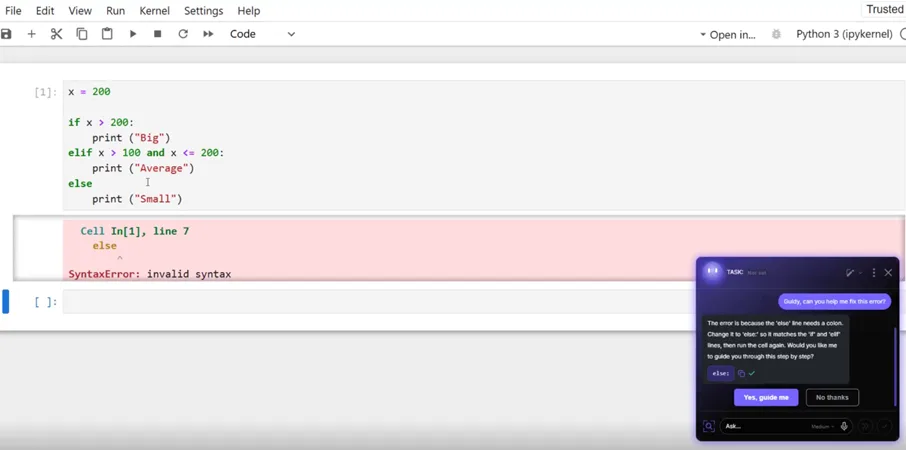
When I'm stuck, I ask in plain language, and Guidy points to the exact button, setting, or line and explains the fix. Most people find it useful when:
- it walks them through a task step by step,
- it finds the feature or setting they can't locate, and
- it helps recover from a visible error.
One thing it deliberately won't do is act for you. Guidy isn’t an AI agent. Nothing happens on your screen unless you make it happen.
What Guidy does well

Guidy stands between knowing what you want and not knowing how to do it. If I hit a NameError in a Jupyter notebook or can't find where a setting lives in an unfamiliar tool, Guidy reads the screen and shows me the fix, the same way it works as an AI code fixer.
It works across any software, not just an editor, so the same AI coding assistant helps in Excel, a database tool, or a browser. And because it explains as it guides, Guidy teaches while it helps, which matters if you're still learning.
Where Guidy falls short
No honest review skips the downsides.
- Guidy isn’t a code generator, so if you want an AI coding assistant to write a full app or a long script from a prompt, this isn't it, and Copilot, Cursor, or a chat model will serve you better.
- Guidy won't act autonomously either, which is reassuring for control but a limit if you wanted hands-off automation.
- It also runs on credits, so heavy use means topping up.
- It's desktop-only, Windows and macOS, with no mobile or Linux build.
- And it's a young product, so the polish and integrations are still growing.
If any of those are dealbreakers, better to know now.
How Guidy differs from other AI coding assistants
Most AI coding assistants live inside your code and write it, while Guidy lives on top of your screen and guides you through it.
- Copilot and Cursor autocomplete and refactor in the editor.
- ChatGPT and Claude generate and explain in a chat you paste into.
- Guidy doesn't compete with those on writing code, it fills the gap they leave: the on-screen, where-is-this, what-does-this-error-mean moments, in any app.
I use a mix of both, a copilot to write, and Guidy when I'm stuck on the interface or an error rather than the logic. If you want the full rundown of the code writers, I compare them in my best AI for coding guide.
How much does Guidy cost?
Guidy is a one-time $69 purchase that includes starter credits, with top-ups available as you go, and there's a free trial so you can test it before paying. The company notes this pricing is in place before it becomes a subscription product, so the one-time deal may not last.
Compared with the roughly $20-a-month AI coding assistants, a one-time price is easy to justify if the on-screen guidance saves the time it promises. Check the current price on the site before buying, since pricing on new tools changes.
Who Guidy is for, and the verdict
Guidy works well for people who get stuck on the interface, not just the code: beginners learning to program, data analysts living in notebooks and spreadsheets, and anyone who works across lots of tools and keeps hitting unfamiliar errors.
If you're a senior engineer who mainly wants code written fast, a copilot will suit you better.
My honest verdict: Guidy isn't the AI coding assistant that writes your program, it's the one that makes sure you're never left staring at a screen wondering what to click next. For the right person, that's worth more than another code generator.
FAQ
Is Guidy free?
Guidy isn't free, but it has a free trial so you can try it before paying. After that it's a one-time $69 that includes starter credits, with top-ups as you need them, and no subscription for now.
Does Guidy write code for me?
No. Guidy is a guide, not a code generator. It reads your screen and shows you what to click, type, or fix, but it won't write a full script or act on your behalf. For generating code, pair it with a copilot or a chat model.
Is Guidy safe with my screen data?
Guidy says it only reads your screen when you actively ask it to, never stores, logs, or shares what it sees, and never uses your data to train AI models, with communication encrypted end to end.
What platforms does Guidy work on?
Guidy runs on Windows and macOS as a lightweight desktop app. There's no mobile or Linux version yet. It works on top of any software you have open, from Excel to a code editor to a database tool.