Best AI for Coding in 2026: Models, Tools & Picks
No time for long YouTube tutorials? Try Guidy and get it all done in minutes. It sits right on your screen and points you to exactly what to do in real time. And it works on any software or browser, in any language.
Try for free
Every few weeks someone on my team asks me the same thing: what should I actually be using to code with now? It's a fair question, since the tools change monthly. I always tell them that the best AI for coding in 2026 isn't one single product, but rather a small stack: the right model, the right editor tool, and the right agent for the job.
In this article, I'll break this down by what you're doing, and I'll be straight about what each option is bad at.
What's the best AI for coding in 2026?
There's no universal winner. Believe me when I say that anyone who names just one is most probably selling something. The best AI for coding depends on the task.
Here’s my short version of it all:
- use Claude, GPT-5.x, or Gemini as your model;
- GitHub Copilot or Cursor inside your editor;
- Claude Code or Devin when a job spans many files;
- and Bolt, Lovable, or Replit when you just want a working app fast.
Most developers I know run two or three of these at once.
Pro tip: There's also a category the tool lists skip: getting unstuck inside whatever you're already using. When an error or an unfamiliar setting stops me cold in an editor, a notebook, or a database, a screen-aware guide like Guidy reads what's on my screen and shows me the next step in place, across any software and language.
The best AI models for coding
Underneath almost every tool sits one of three models, so the best AI model for coding is really a three-way race: Anthropic's Claude (Opus and Sonnet), OpenAI's GPT-5.x, and Google's Gemini 3.
In 2026, they've converged hard. Even the best coding AI still gets roughly half of real-world tasks wrong, so it's a fast assistant, not an autopilot.
My rule of thumb: Claude for long, multi-step reasoning over big files, GPT for speed and breadth, Gemini if you live in Google Cloud. The gap is small enough that the tool wrapped around the model matters more than the model. (If Python is your main language, I go deeper in my best AI for Python coding guide.)
The best AI coding assistants for your editor
For writing code where you already work, an AI coding assistant that lives in your editor is the daily driver.
- GitHub Copilot is still the default: lowest friction, works across VS Code, JetBrains, and Neovim, and has the widest reach.
- Cursor is the stronger pick for multi-file edits and large codebases, thanks to its Composer and @-mention context.
- Tabnine matters if you need self-hosted or air-gapped AI coding tools for a regulated shop, and JetBrains AI is the natural fit if you already pay for PyCharm or IntelliJ.
For most people the call is simple: Copilot to start, Cursor once your changes get bigger.
The best AI coding agents for bigger jobs
When a task spans a whole repo, I reach for an agent instead of an assistant. The best AI coding agent for you depends on your comfort with the terminal.
- Claude Code plans before it edits and shows diffs before applying them.
- Aider and Cline are the open-source options: bring your own API key, keep full control of cost and code, and review Git diffs before anything lands.
- Devin, now from Cognition, is the most autonomous, strong on well-scoped tasks like a single bug fix and shakier when the job is vague.
These AI coding agents are powerful, but they burn tokens fast, so I keep an eye on what they're doing rather than letting them run loose.
The best AI for vibe coding
But first, here’s a brief definition of vibe coding: Vibe coding is building software by describing what you want in plain language and letting an AI write the actual code, then steering it with more prompts instead of editing the code yourself. You focus on the intent and the result, the "vibe" of what you're after, and let the model handle the syntax.
What’s the best AI for vibe coding?
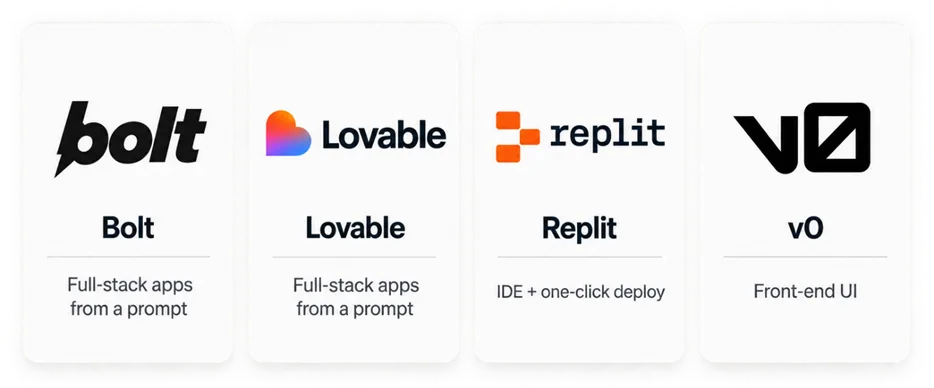
The best AI for vibe coding is a browser tool that turns a prompt into a running project: Bolt and Lovable generate full-stack apps from a description, Replit gives you an IDE with one-click deploy, and v0 is strong for front-end UI.
Cursor's agent mode straddles the line for people who still want to see the code.
These are brilliant for prototypes, demos, and MVPs. Just make sure you don't confuse a vibe-coded MVP with production software.
Best free AI for coding
You can get a long way without paying. The best free AI for coding for most people is GitHub Copilot's free tier, which now includes a solid monthly allowance of completions and agent requests. The free versions of ChatGPT, Claude, and Gemini are genuinely useful for writing and explaining code, just rate-limited. In addition, Cline and Aider are free software and you only pay for the model calls.
Will AI replace coders?
In Stack Overflow's 2025 developer survey, 46% of developers said they distrust the accuracy of AI output, more than the roughly one-third who trust it, and that skepticism is earned: these tools invent functions, misread intent, and write code that passes a glance but not a test. So no, coding isn't being replaced by AI, it's being reshaped.
The work is shifting from typing every line to directing, reviewing, and understanding what ships. The people getting the most from the best AI for coding are the ones who still read every diff, and if you're learning, a guide like Guidy can walk you through fixes while you build that judgment. Speed is the easy part now; judgment is the moat.
FAQ
What's the difference between an AI coding assistant and an AI coding agent?
An AI coding assistant autocompletes and edits inside your editor while you drive, like GitHub Copilot or Cursor. An AI coding agent takes a whole task and works across files on its own, showing you diffs to approve, like Claude Code or Devin. Assistants help you type; agents do the legwork.
Is vibe coding production-ready?
Not yet, for most things. Vibe-coding tools like Bolt, Lovable, and Replit are great for prototypes, demos, and MVPs, but the code usually needs hardening for security, scale, and edge cases before real users touch it. Use it to validate an idea, not to ship a bank.
Which AI coding tools are free?
GitHub Copilot's free tier is the best all-round free option, and ChatGPT, Claude, and Gemini all have useful free versions. Cline and Aider are free, open-source agents where you only pay for the model's API calls.
Should my team standardize on one AI coding tool?
Usually no. Most teams get more from a small stack: an editor assistant for daily work, an agent for big refactors, and a review or security tool on top. Standardize on the model and the guardrails, not a single app.