The Best ChatGPT Alternatives in 2026
No time for long YouTube tutorials? Try Guidy and get it all done in minutes. It sits right on your screen and points you to exactly what to do in real time. And it works on any software or browser, in any language.
Try for free
ChatGPT is genuinely great. It led us to where we are today. Our kids are probably going to learn about it at school the way we learned about floppy disks. When I was still junior back in the day, there was no ChatGPT, so I’d either go ask a colleague for help or start googling for guidance.
Today, I have so many more choices. And I can say for a fact that ChatGPT isn't always the right tool if I need quick help inside the files I've got open. That's why so many people go looking for the best ChatGPT alternatives. And which one is the best usually comes down to what you’re trying to get done. That’s probably how you ended up reading this article as well.
A note from the author:
A few months ago, I’d sometimes end up spending half an hour figuring something out through ChatGPT: copy-pasting screenshots, switching tabs a million times to check the instructions against my screen, only to get lost even further. So I keep googling for interpretations.
And honestly, as someone who isn't the most tech-savvy person in the room, that stresses me out a lot. There was even a point when I cancelled my ChatGPT subscription. I didn't want to keep leaving my work to ask a chatbot and then translate its answer back, I just wanted to be told where to click right where I was working.
Then Guidy came along. And I’m part of the team that brought it to life. I’m here to tell you what I think makes Guidy one of the best ChatGPT alternatives.
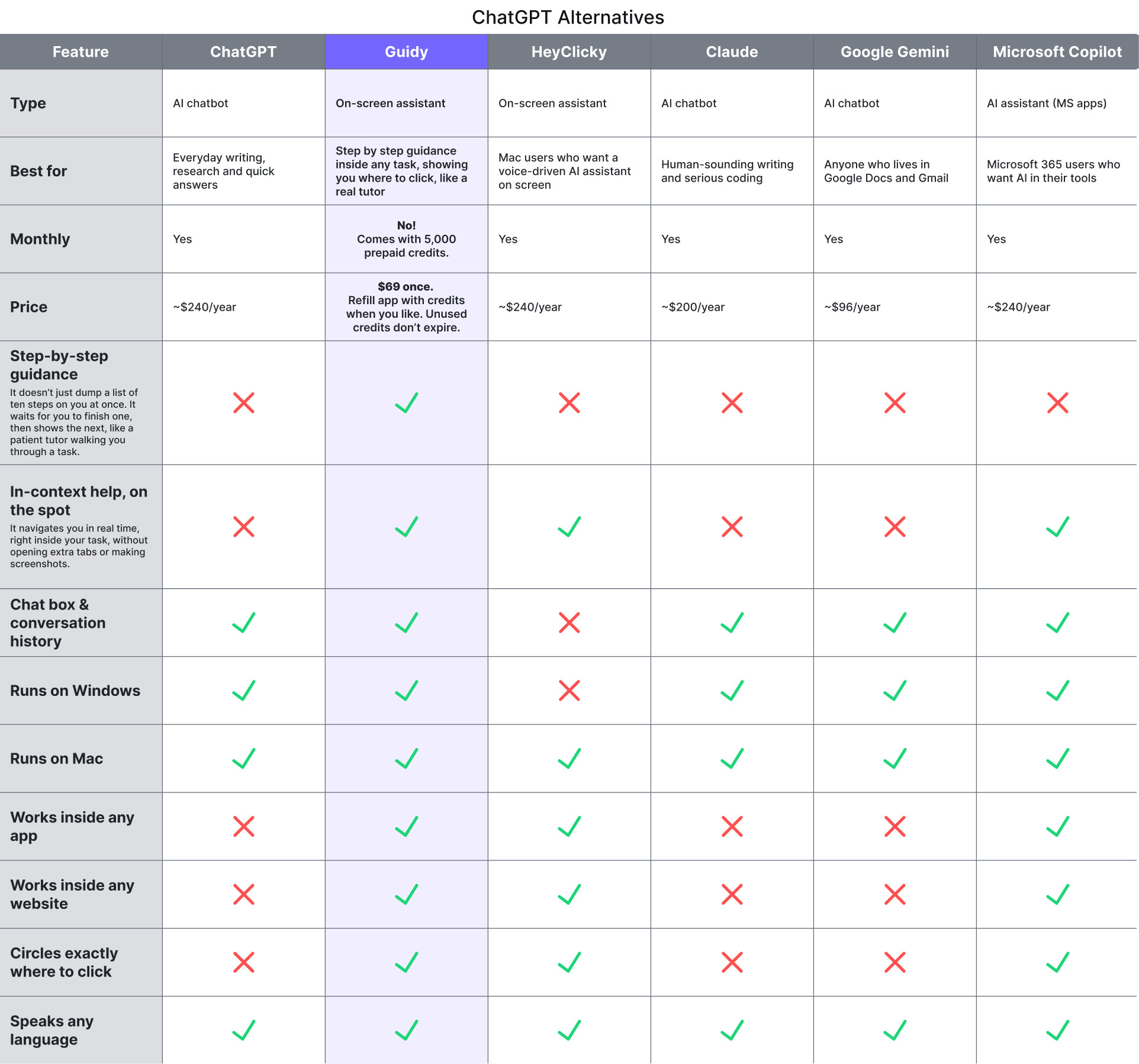
Figure 1: Comparison table of the best ChatGPT alternatives in 2026: Guidy, ChatGPT, Claude, Gemini, Copilot and HeyClicky
ChatGPT
ChatGPT was launched by OpenAI in late 2022, and within just two months 100 million people started using it, making it the fastest-growing app at the time. Its co-founder, Sam Altman, has become the face of the whole AI boom: a Stanford dropout who ran Y Combinator, then got fired by his own board in 2023, only to be back five days later after 500+ staff threatened to walk.
Today, ChatGPT helps around 900 million users tackle daily tasks of all sorts every week. And there’s a wave of ChatGPT competitors that have caught up fast, which is probably how you ended up here. 😊
Fun fact: Altman owns no direct equity in OpenAI. His fortune comes from other investments like nuclear-fusion startups and early stakes in companies like Stripe and Reddit.
Pros
- It'll have a go at almost anything you throw at it. Writing, ideas, research, quick answers.
- It's the best of those in the list at making images. Claude can't make them at all.
- More apps and tools plug into ChatGPT than anything else out there.
- It usually gets the shiny new features first, like voice and those little custom GPTs.
Cons
- The writing can come out a bit flat and AI-ish. Claude sounds more human to most people, me included.
- If you're doing proper coding, most people trust Claude more.
- Gemini handles video, images in your files, and really long documents better.
- It's fine inside Google or Microsoft apps, but not as good as Gemini or Copilot are on their own turf.
Personal take
If I just want one tool that has a crack at everything, ChatGPT is the safe pick. But it's still a chatbot. The moment I'm stuck inside a file and just want someone to show me where to click, all that power doesn't really help me, so I look for a ChatGPT alternative.
Guidy
Guidy is an AI on-screen assistant. Instead of answering you in a chat window, it guides you right on your screen and shows you where to click, step by step, inside whatever app (or website) you already have open. That approach makes it a very different kind of ChatGPT alternative.
Guidy’s powered by 365 Data Science and 365 Financial Analyst, education platforms where we (I work here, hence the ‘we’ 😊) spent over a decade teaching over 4 million people how to use software.
But we kept running into the same thing over and over again: our students learn best by doing, but the moment they got stuck inside an app, everything ground to a halt.
It was built to keep non-tech savvy people of all ages moving without interrupting whatever task they’re doing, like a real tutor sitting next to you. And it’s best for anyone who needs step by step guidance in any software right on the spot, without the annoying routine of attaching screenshots in ChatGPT, no opening of separate tabs in your browser. It’s super-fast, adjusting its speed and patiently waiting for you to take the next step.
What makes it different
Three things.
First, it doesn't answer or take over, it guides. It circles the exact button or field you need, waits for you to click it, then shows you the next step, like a patient tutor sitting beside you.
Second, it works pretty much anywhere: any app, any website, in any language, even that clunky internal tool nobody ever wrote a manual for. And it’s compatible with Windows and Mac.
And third, there's no subscription. You pay $69 once, get 5,000 prepaid credits to spend whenever you're stuck, and they never expire.
It’s a great tool if you’re new to software, or if you’re starting a new job and need help to onboard. As an AI that can see your screen, it’s also very effective in finding missing features, because it shows you where something is and it even explains what the area is about and what you can do there with its Inspect Area feature.
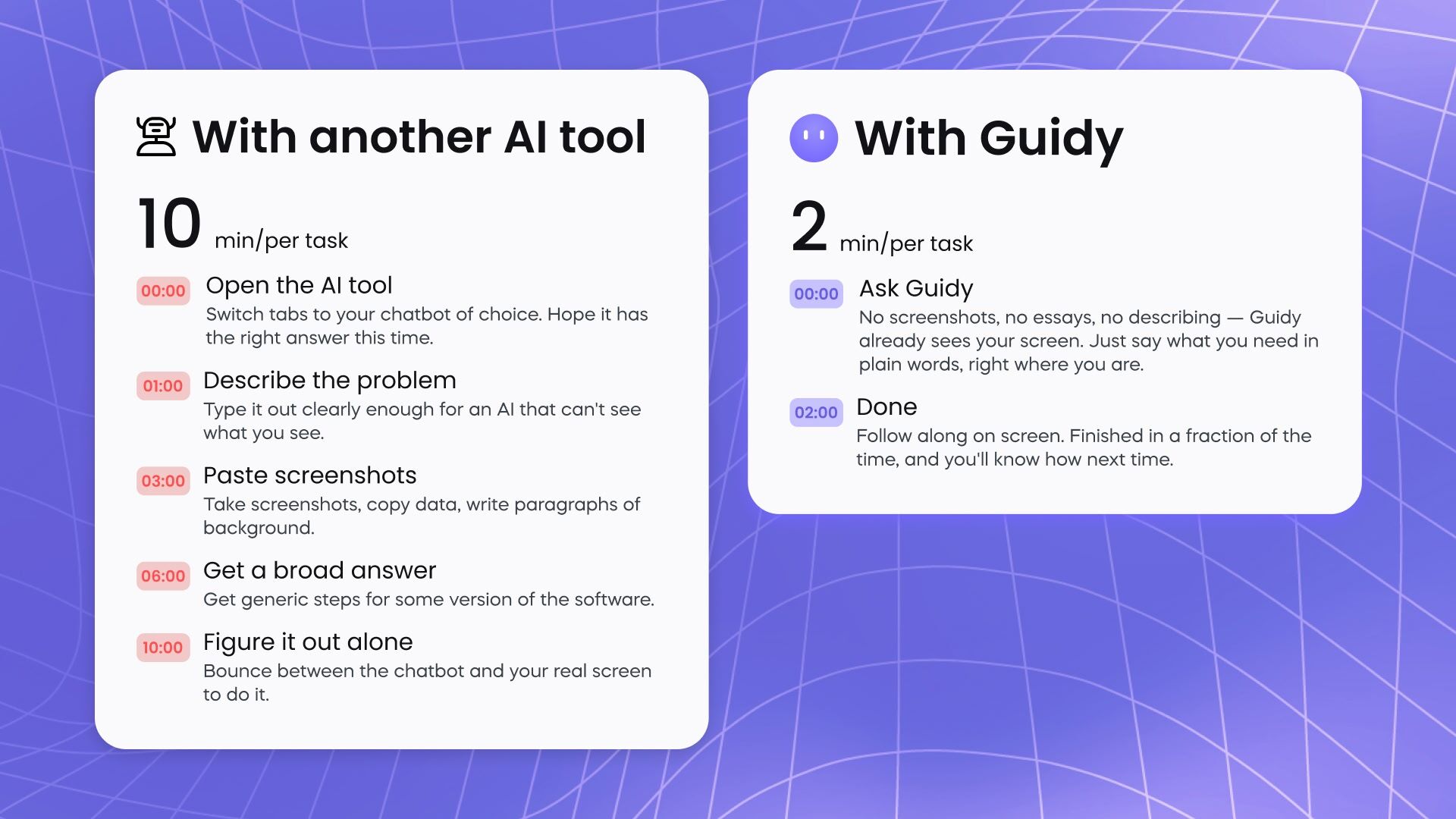
Figure 2: Guidy, an on-screen ChatGPT alternative, circling exactly where to click to build a pivot table in Excel
Pros
- Shows you, not just tells you. It points to the exact button in real time, so the task gets done and your new skill sticks.
- Works everywhere. Any app, any website, in any language. No restrictions.
- Easy to install. It sets up in a click, with no plugins or extensions to add.
- Windows and Mac. It runs natively on both, no browser workaround needed.
- Pay once. $69 one-time, with 5,000 starter credits and no subscription.
- Privacy-first. It only looks when you ask, stores nothing after a session, and never trains on your screen.
Cons
- Desktop only. It runs on Windows and Mac, but there's no mobile app
- It guides, it doesn't do. You still click through the steps yourself, so if you want a task fully automated, that's a different kind of tool
- Credit-based. Heavier walkthroughs use more credits, so big users should keep an eye on the balance
- Still young. It launched in 2026, so the track record is short and the feature set is still growing
Personal take
This is the tool I wished existed back when I was at university, doing some freelance editor gigs. It's the only one that helps me without dragging me out of my work, and I've stopped dreading forms and unfamiliar software since I started using it. It won't write my copy for me, but for actually getting things done with tools I need daily like Ahrefs, Semrush, Google Analytics, GSC, Excel, Canva, nothing else comes close. For actually getting work done, it's the best AI assistant for work I've tried.
Fun Fact: Remember Clippy, the paperclip that popped up in Word? Guidy is its spiritual grandkid, and there's a whole Instagram account playing them as grandpa and grandson.
HeyClicky
HeyClicky is one of the most-hyped ChatGPT competitors right now. It's a sleek, Mac-native assistant built around voice: you hold a hotkey, ask out loud, and it points on your screen to show you what to do. Founder Farza Majeed, a well-known Silicon Valley name who earlier built the 100,000-strong Buildspace community, put it together in about eight weeks. The demo went viral, it got into Y Combinator, and it raised $10.1 million.
HeyClicky can also do the task for you. It goes off and finishes a whole job in the background while you carry on with something else. Those jobs tend to be fairly techy, though, so it fits business users more than everyday ones.
Pros
- Sleek. The interface is polished and it feels modern to use
- Voice-first. You hold a hotkey and talk, and it can draw right on your screen to show you where to go
- Built-in dictation. It doubles as a fast, screen-aware speech-to-text tool, so you can dictate instead of type
- Great free demo. The freemium version lets you actually try it before paying, which more tools should copy
- Buzzy. YC funding and a viral following mean it's improving quickly
Cons
- Mac only. There's no Windows version, so most work computers are out
- Subscription with a cap. It's $20 a month and limited to about 150 actions, since each one is pricey to run behind the scenes
- No true step-by-step mode. It points and answers but doesn't wait for you to finish one step before showing the next, the way Guidy does
- No chat box or history. There's no saved record of your questions to look back on.
- Leans toward doing it for you. Its "clicky agents" run tasks on their own
Personal take
HeyClicky is genuinely cool, and Farza clearly knows how to go viral. My honest take, though, is that it might feel like it's building the plane while flying it. Features ship before they're finished, so the demos on social media look smoother than the day-to-day experience I had with it. But as a screen-based ChatGPT alternative it's kind of exciting.
Claude
Claude is a chatbot built by Anthropic, reportedly named after Claude Shannon, the father of information theory. Anthropic sits alongside OpenAI and Google as one of the biggest AI labs in the world. It was recently valued at around $965 billion, the most valuable private AI company, ahead of even OpenAI, on an annual revenue run rate close to $47 billion.
It was founded in 2021 in San Francisco by a group of OpenAI employees who worried AI was being built too fast and too carelessly, led by siblings Dario and Daniela Amodei. That worry is baked into the product: Claude is trained with a written "constitution", a set of principles it follows to stay careful and safe. The result is a chatbot that's thoughtful, articulate, and the one a lot of writers and developers quietly prefer.
Fun fact: Anthropic's researchers reached into Claude's internal wiring and released "Golden Gate Claude". It mentioned Golden Gate Claude in almost every answer, even a cookie recipe. That was a cool demonstration of how they could peek inside the model and steer what it's thinking.
Pros
- The best writer. Its default tone is the most natural and least "AI-sounding", so drafts need less cleanup.
- Top-tier at coding. Developers rate it the best AI coding tool, so it handles serious technical work.
- Strong with long documents. It's great for detailed analysis and working through big files.
- Careful and thoughtful. It reasons through a problem instead of just firing back an answer.
Cons
- Still just a chat window. Like ChatGPT, it answers in a separate box.
- No image generation. It won't make images, where ChatGPT and Gemini can.
- Smaller ecosystem. Fewer apps and integrations plug into Claude than ChatGPT.
- Subscription-based. The useful tier runs about $17 to $20 a month.
Personal take
Claude is the chatbot I respect most. If I had to write a long report, tighten a tricky paragraph, or debug some code, it's the first thing I'd open, the writing comes out clean and it rarely loses the thread.
But it’s still a chatbot in a separate window, so when I'm stuck halfway through something in Excel, or staring at a form I don't understand, it can tell me what to do, but I'm still the one squinting at my screen trying to find the button Claude just described. That's the exact gap Guidy fills for me.
I keep Claude for writing and thinking and reach for Guidy when I need to actually get something done on my own screen quickly. For pure writing, though, Claude is the ChatGPT alternative I trust most.
Google Gemini
Gemini is Google's AI, built by its DeepMind lab. You might remember it as Bard, which was its name until Google renamed it in 2024. The main thing to know is that it lives inside Google. For anyone living in Google's world, it's the most natural alternative to ChatGPT. It's also genuinely good with images, video, and long documents, which is where it pulls ahead of the other chatbots.
Fun fact: The guy running the team behind Gemini, Demis Hassabis, built hit video games as a teenager, then went on to win a Nobel Prize. Not a bad resume at all.
Pros
- It's built directly into Google Docs, Gmail, and Drive, so it can help without you leaving the app.
- It handles images and video super well.
- It manages long documents without losing track.
- It's affordable, with paid plans costing around $8 a month.
Cons
- Its strengths are mostly tied to Google's own apps. Elsewhere, it's a fairly standard chatbot.
- It works in a separate window, so you still carry out the steps yourself.
- Its performance can be rather inconsistent.
- By default, Google stores your chats and may use them to train its models, though you can turn this off in settings.
Personal take
If I spent all day on Google Docs, Gemini is the obvious alternative to ChatGPT. It's right there and it's smart. But it's still a chatbot in a tab. When I get stuck in a spreadsheet or a tricky form, I just want to be shown where to click. That's why I mostly stick with Guidy.
Microsoft Copilot
Copilot’s Microsoft's AI, and it's pretty much wherever Microsoft already is: Windows, Word, Excel, Outlook, Teams, the lot. The funny part is that it mostly runs on OpenAI's models, so half the time you're basically chatting with ChatGPT in a Microsoft jacket. If your whole day happens in Office, that's the appeal: it's already sitting in the apps you use, no new tab to open. For many companies, it's the go-to ChatGPT alternative at the moment.
Fun fact: Тhe name "Copilot" actually started with a coding tool, GitHub Copilot, back in 2021. Microsoft liked it so much it now brands almost everything Copilot: Windows Copilot, Security Copilot, you half expect a Copilot for the coffee machine next.
Pros
- It's built right into Microsoft 365, so it can help without you leaving the app.
- With Copilot Vision, it can look at your screen and answer questions.
- It runs on strong models, often the same ones behind ChatGPT.
- The paid AI comes with the Microsoft 365 plans many people already pay for.
Cons
- Its strengths are mostly tied to the Microsoft 365 world. Outside Office, there are stronger standalone chatbots.
- It often lags ChatGPT on new features.
- It answers but it doesn’t walk you through a task step by step.
- Guidance is not always the most accurate and I noticed frequent misleading facts given to me by Copilot in my workflow.
Personal take
Honestly, Copilot only really makes sense if your whole day already runs on Word, Excel, and Outlook. If you step outside Microsoft's world, there are stronger standalone chatbots. And even inside it, Copilot still sits in a side panel, answering more than it guides.
When I'm stuck in the middle of a task, and I need a quick fix on a technical struggle of mine, it doesn't do the one thing I want: show me exactly where to click, in whatever app I'm in. In fact, no ChatGPT alternative truly does that for me except for Guidy.
ChatGPT alternatives by category
AI helps me a lot in my work and in my life. I often ask it for help on how to explain things to my 4-year-old child, like "Why does the Sun go up every day?" At work, I use it to build marketing briefs, or to work on my expense reports. I also enjoy the various market-research tools that I integrate into Claude that take over my browser to conduct research while I'm doing something else. And I now use Guidy to find step-by-step guidance for fixing an error in Excel, while working in Canva and I need some functionality, etc.
AI that gives you answers (chatbots)
It's the classic way of looking for instructions to solve a problem. You type in a specific problem and you get a list of steps to follow. ChatGPT works the same way: you ask a question and you get an answer. This is great for writing, research, and quick facts. The catch is that the answer sits in a separate window, meaning you still need to find everything on your screen by yourself.
AI that does it for you (AI agents)
AI agents are very trendy, but there's a trade-off to be aware of. When something does your job for you, you can never present the result quite as convincingly later. And you don't learn anything. It's automation, but at the expense of what? Discovering new things and growing your creativity, maybe.
AI that does it alongside you (AI guidance)
This is Guidy and partly HeyClicky. Unlike most other AI like ChatGPT, it’s almost human, but only when you need help. It gives you answers, but they are not as generic as the ones you’d normally get from a chatbot. At the same time, you still have full control of your project because you don’t automate the whole workflow like AI agents do. A context-aware AI assistant will point and say, “Here’s what you need,” but it’s you who clicks and not the machine. Also, it waits until you’re ready and adapts to what you need done based on what you have on your screen. It almost feels like a real person sitting by your side.
How each type of AI handles one real task
Here’s a real-life task: Suppose your boss wants you to create a Pivot Table in Excel because he needs it for an upcoming meeting the next day, and you've made one before but can't remember how. Here's how each of the three kinds of AI I mentioned above would handle it - from a plain chatbot to an on-screen ChatGPT alternative like Guidy.
- A chatbot gives you a list: you must select your data, go to Insert, click Pivot Table, and drag your fields in. You read it and you go to Excel to give it a try. But you notice your ribbon looks a bit different from the description, there’s also a button the steps didn't mention, and you're tabbing back and forth trying to match your instructions with what you see on your actual screen. On average, it’ll take you about 30 minutes this way.
- An AI agent builds a Pivot Table for you. Great, until next month when you need another one and realize you still have no idea how. Sometimes, putting in the effort to finish a task opens up unique ways for creative ideas to flow, ideas you wouldn't have come up with otherwise. Getting your hands dirty is part of the game, and saving a few minutes or dollars here and there will cost you a lot more in the future. Because it always feels like you're putting out fires, and the time you used to have for new ideas, the time you spent building those Excel tables or learning something new, gets eaten up by managing more AI instead.
- An on-screen AI assistant (like Guidy) combines the best of both worlds. It points inside your Excel spreadsheet just like so: Click right here to select your data range, including the column headers. Press Insert. Choose a Pivot Table.
You can ask it to guide you by circling on your screen:
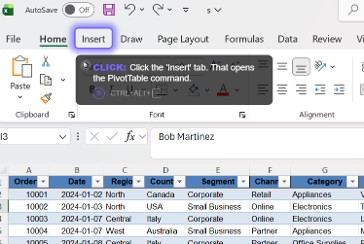
Figure 3: Guidy, an on-screen ChatGPT alternative, circling exactly where to click to build a pivot table in Excel
Or in text form:
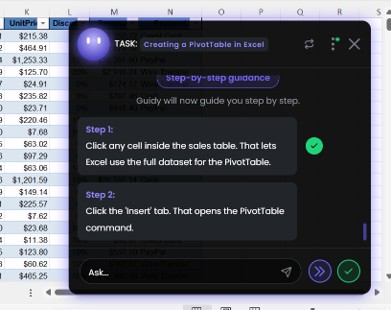
Figure 4: Step-by-step guidance from Guidy, an on-screen ChatGPT alternative, building a PivotTable in Excel
And if you slip up on a step, Guidy notices and helps you get back on track, showing you the right button. It's literally like having a friend who makes Pivot Tables for a living lean over your shoulder and tell you what to click. Isn't that what we wanted all along? 😊
What are the best ChatGPT alternatives?
There's a whole crowd of other AI tools like ChatGPT now, from the big-name chatbots to a new kind of on-screen assistants, and the honest answer is that the best one depends on what you're trying to do.
Here's the short version of ChatGPT competitors:
- Guidy is best if you keep getting stuck inside your software and want to be shown how. It's an AI that can see your screen and walk you through the task in any app, for a one-time price, which makes it the best AI assistant for work if you learn by doing.
- Claude is best for natural writing and serious coding.
- Google Gemini is best if you work across Google Docs, Gmail, and Drive.
- Microsoft Copilot is best if you work inside Word, Excel, and Outlook.
- HeyClicky is best for Mac users.
Most of the other AI like ChatGPT are variations on the same chat window. If you just want a smarter chatbot, any of them will do. Among all of them though Guidy is the one that shows you how on your own screen, which makes a big difference if you don’t have much time to research how-to tutorials.
The bottom line
Which are the best ChatGPT alternatives? All six tools are genuinely good, they just help in different ways. Most of them either answer you or do the work for you. Guidy is the one that shows you how, right on your own screen, so the task actually gets done and you remember how next time. Learn more about Guidy now.
FAQs
What is the best alternative to ChatGPT?
It depends on what you do with it. Claude is great for writing and code, Gemini for Google users, Copilot for Microsoft users, and HeyClicky is an amazing work-in-progress AI assistant, currently for Mac fans only. If you need real guidance on your screen that understands what you’re doing in the moment, the best alternative to ChatGPT is Guidy, because it shows you where to click on your own screen and it works anywhere. If you learn by doing, it's the best ChatGPT alternative out there.
What's better than ChatGPT?
Nothing (except for Guidy) beats ChatGPT at everything, but plenty of ChatGPT alternatives are better than it at specific tasks. Claude tends to write and code better, Gemini and Copilot fit better inside Google and Microsoft apps, and for step-by-step help inside your software, Guidy is better than ChatGPT because it guides you instead of just answering in a chat.
Guidy vs ChatGPT: which should I use?
Use ChatGPT to write, research, or generate things. Use Guidy, the on-screen ChatGPT alternative, when you're stuck inside an app and want to be shown how to do something, step by step, on your screen. A lot of people keep both.
Is there an AI that can see your screen?
Yes. Guidy and HeyClicky are built around it, they see your screen and guide you on it. Microsoft Copilot can see your screen too, and ChatGPT and Claude can read a screenshot you share. But Guidy is the ONLY ChatGPT alternative that actually uses it to walk you through the task step by step in the moment.
What's the best AI assistant for work?
It depends on your work. For writing and email, a chatbot or another AI like ChatGPT is fine. But if you want to get things done inside spreadsheets, forms, and apps you don't use every day, the best AI assistant for work is one that guides you on screen, which is Guidy's whole thing.
Is there a free ChatGPT alternative?
Yes, there is. Most ChatGPT alternatives like Claude, Gemini, Copilot, and HeyClicky have free tiers. Guidy isn't free forever, but it's free to try as well, and after that it's a one-time $69 rather than a monthly subscription.