
Why Is My Computer So Slow? Easy Fixes to Try
No time for long YouTube tutorials? Try Guidy and get it all done in minutes. It sits right on your screen and points you to exactly what to do in real time. And it works on any software or browser, in any language.
Try for free
I sat down to check my email last week, and my computer took a full two minutes just to open the browser. If you're wondering, “Why is my computer so slow?” here's a quick take: it's almost never one big problem, it's several small ones piling up, and most of them are free and easy to fix yourself. Let me walk you through what I usually check.
Why is my computer so slow? The short answer
- A computer running slow usually comes down to:
- too many programs launching at startup,
- a hard drive that's nearly full,
- a browser with a dozen tabs and add-ons open,
- software that's out of date, or
- a machine that's simply getting on in years.
Sometimes it's a virus, but far more often it's just clutter. The good news is that you can work through these, and you'll usually feel a difference after the first two or three.
Important note: None of this requires buying anything or being good with computers.
Why is my computer so slow all of a sudden?
If your computer was fine yesterday and crawling today, a few things tend to be behind it:
- a background update may still be installing,
- a program you recently added might now launch at startup, or
- a browser extension could be misbehaving.
- a drive that's almost full slows down suddenly once it crosses a certain point, and
- overheating from dust can throttle things too.
If it got slow right after a suspicious pop-up or download, malware is worth ruling out, and our guide on online safety for seniors might touch-base on a few use cases how. It's also why a new computer can feel so slow at first, usually the pre-installed trial software running in the background.
How to speed up a slow computer
Here's how to speed up my computer when it drags, and every step is free:
- Restart it.
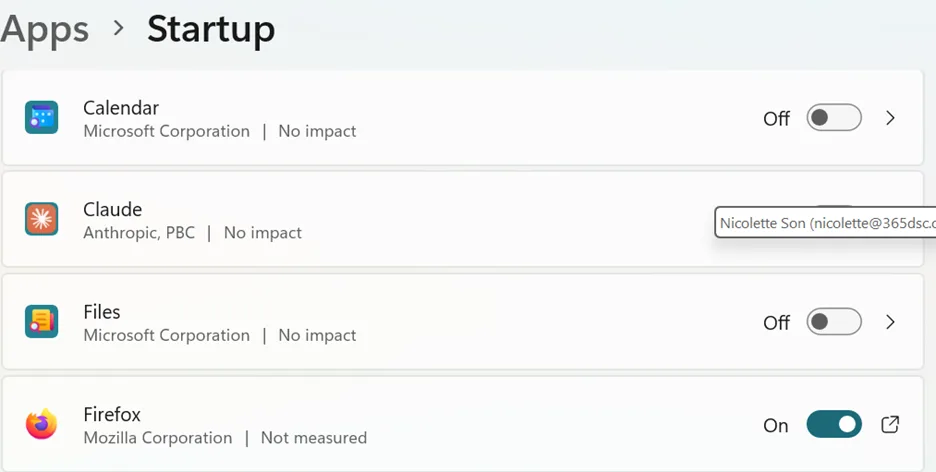
- Close startup programs. Open Task Manager (shortcut: Ctrl+Shift+Esc), click the Startup tab, and disable anything you don't need launching at boot.
- Uninstall programs you never use. On Windows, go to Settings, then Apps.
- Trim your browser. Close spare tabs and remove add-ons you don't recognize.
Work through those four and you've handled most of how to fix a slow computer.
Author’s note: If any of those menus feels unfamiliar, Guidy, an AI for seniors that reads your screen, can point you to the exact button and walk you through each step.
How to clean up your computer to run faster
Freeing up space is the other half of the job. To clean up your computer to run faster, search for Disk Cleanup on Windows 10 or Windows 11 (or open Storage on a Mac) and clear temporary files.
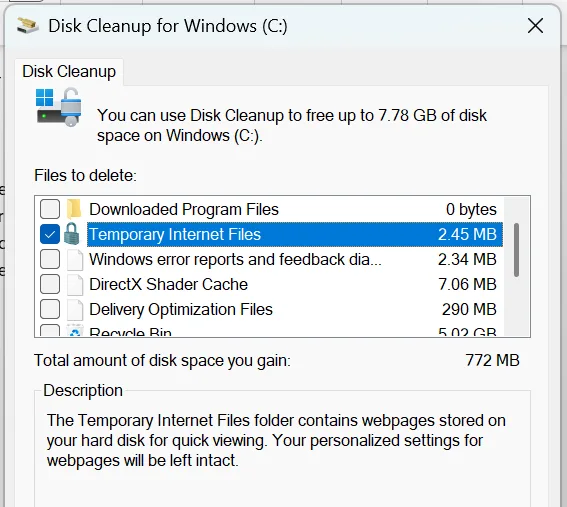
You should also empty your recycle bin, then move photos and videos you rarely open to an external drive, since a stuffed drive is one of the biggest culprits.
The goal is to keep at least 15 percent of your drive free at all times.
Why is my laptop so slow?
If you're asking “Why is my laptop so slow?” laptops add a couple of factors a desktop doesn't. Check your power settings first, since a laptop set to a battery-saving plan runs slower on purpose. Overheating is common too, and it's often just dust in the vents.
And whether you're trying to fix a slow laptop from HP, Dell, or Lenovo, each one ships with its own "helper" apps running in the background that you can uninstall as well.
When a slow computer means it's time to get a new one
Oftentimes, the answer is age. If you've tried all of the above and still reading this article, asking “why is my computer so slow?” a machine that's seven years old, with a spinning hard drive and little memory, is doing its best. Be kind to it, there’s a beautiful sentiment to it after all. 😊
Two affordable upgrades change everything here:
- Swapping in a solid-state drive (SSD)
- Adding more RAM
These can make an old computer feel brand new for email and browsing. But if it can't run current updates, or a repair costs nearly as much as a replacement, it's fair to bid it goodbye and move on.
FAQ
How do I find out what is slowing down my PC?
Open Task Manager (Ctrl+Shift+Esc on Windows) or Activity Monitor on a Mac, and look at the Processes tab sorted by CPU or Memory. Whatever sits at the top is using the most power. On Windows, the Startup tab also shows what launches automatically and drags out your boot time.
How do I clean up my PC so it runs faster?
Run Disk Cleanup on Windows (or Storage on a Mac) to clear temporary files, empty the recycle bin, uninstall programs you don't use, and move photos and videos to the cloud or an external drive. Freeing space and cutting startup programs makes the biggest difference.
Why is my computer so slow on a Mac?
A Mac slows down for the same reasons as a PC: a nearly full drive, too many apps open or launching at login, and simple age. Check Apple menu, then System Settings, then General, then Storage, and trim your login items to speed things back up.
Is a 7-year-old computer still worth keeping?
Often yes, especially if you add an SSD and more RAM, which can make an old machine feel new for everyday tasks. But if it can't run current updates, or the repair bill approaches the price of a new one, replacing it is the smarter move.
My computer is slow, what can I do first?
Restart it first, since that alone clears memory and fixes many slowdowns. Then close programs you're not using, check Task Manager for anything hogging resources, and free up disk space. Those three free steps solve most everyday slowness.